|
|
Hello, Kinbay, Could you please let me know the writing GSI script for Eagle OS10? I got following script from Jason, but the fastboot device couldn't find. adb shell "reboot bootloader" fastboot flashing unlock fastboot flashing unlock_critical fastboot reboot fastboot => after run this command, there is no fastboot device fastboot flash system system.img fastboot reboot bootloader fastboot -w fastboot reboot Thank you. Sangmin Choi. |
|
|
Hi Choi I just tried the commands with aml_upgrade_k000b-541r67_SD_BFX-AT100.img I can detect the fastboot device after "fastboot reboot fastboot" command. (as attach screenshot) What version are you using for the test? Thank you Kinbay image.png (40,680 bytes) |
|
|
Hello, Kinbay, As we discussed at WeChat, I can see the fastboot devices after update platform tools. Thank you. Sangmin Choi. |
|
|
Hello, Kinbay, I was confused yesterday, it didn't work. I think the problem is PC can't detect the STB when the STB enter the fastboot mode(adb reboot fastboot). But, OS12 has no problem. I used the same PC, USB cable, STB. Below is the dmesg from PC. ################################################################################### OS12 (15.542.64) // SKBFXYZO0DTP connected with ADB [수 6월 12 12:11:02 2024] usb 4-2.4: new high-speed USB device number 8 using xhci_hcd [수 6월 12 12:11:02 2024] usb 4-2.4: New USB device found, idVendor=18d1, idProduct=4ee7, bcdDevice= 4.40 [수 6월 12 12:11:02 2024] usb 4-2.4: New USB device strings: Mfr=1, Product=2, SerialNumber=3 [수 6월 12 12:11:02 2024] usb 4-2.4: Product: BFX-AT100 [수 6월 12 12:11:02 2024] usb 4-2.4: Manufacturer: Foxconn [수 6월 12 12:11:02 2024] usb 4-2.4: SerialNumber: SKBFXYZO0DTP // adb reboot fastboot [수 6월 12 12:11:43 2024] usb 4-2.4: USB disconnect, device number 8 // device can be detected again [수 6월 12 12:11:58 2024] usb 4-2.4: new high-speed USB device number 9 using xhci_hcd [수 6월 12 12:11:58 2024] usb 4-2.4: New USB device found, idVendor=18d1, idProduct=4ee7, bcdDevice= 2.23 [수 6월 12 12:11:58 2024] usb 4-2.4: New USB device strings: Mfr=1, Product=2, SerialNumber=3 [수 6월 12 12:11:58 2024] usb 4-2.4: Product: BFX_AT100 [수 6월 12 12:11:58 2024] usb 4-2.4: Manufacturer: droidlogic [수 6월 12 12:11:58 2024] usb 4-2.4: SerialNumber: SKBFXYZO0DTP ################################################################################### OS10 (15.541.67) // SKBFXYZO0DTP connected with ADB [수 6월 12 12:23:45 2024] usb 4-2.4: new high-speed USB device number 10 using xhci_hcd [수 6월 12 12:23:45 2024] usb 4-2.4: New USB device found, idVendor=18d1, idProduct=4e40, bcdDevice= 2.23 [수 6월 12 12:23:45 2024] usb 4-2.4: New USB device strings: Mfr=1, Product=2, SerialNumber=3 [수 6월 12 12:23:45 2024] usb 4-2.4: Product: BFX_AT100 [수 6월 12 12:23:45 2024] usb 4-2.4: Manufacturer: droidlogic [수 6월 12 12:23:45 2024] usb 4-2.4: SerialNumber: SKBFXYZO0DTP // adb reboot fastboot [수 6월 12 12:25:17 2024] usb 4-2.4: USB disconnect, device number 10 // there is no device detected Could you please help me? I can't write the GSI until now. Thank you. Sangmin Choi. |
|
|
Hi Choi Do you try replugging the USB after the "adb reboot fastboot" command? Best Regards Kinbay |
|
|
Hello, Kinbay, Yes, I did. But there was no fastboot devices. |
|
|
Hi Choi If the STB changes to fastboot status. The HDMI will show up as an attached screenshot. Please check it. If the STB fastboot status shows up and still can't detect the fastboot device. I think this is about the PC or USB port problem. Here is my suggestion: 1. Try to plug in another USB port. 2. If you plug under the USB hub try to remove it. 3. Try on another PC. Best Regards Kinbay |
|
|
Hello, Kinbay, After remove USB Hub, it works. How can you write GSI image several devices? Do you write one by one? Thank you. Sangmin Choi. |
|
|
Hi Choi How can you write GSI image several devices? Do you write one by one? >> Yes we only write one by one for test. Best Regards Kinbay |
|
|
Hello, Kinbay, Okay, I got it. Thank you. Sangmin Choi. |
|
|
Hello, Kinbay, There is below fail item in VTS. Could you please let me know how can I pass this item? armeabi-v7a VtsKernelNetTest VtsKernelNetTest#testKernelNetworking Error detail: kernel_net_tests binary returned non-zero exit code: ====================================================================== FAIL: testMarkBytecode (sock_diag_test.SockDiagMarkTest) ---------------------------------------------------------------------- Traceback (most recent call last): File "/data/nativetest/kernel_net_tests/kernel_net_tests/sock_diag_test.py", line 1101, in testMarkBytecode self.assertFoundSockets(infos, [s1, s2]) File "/data/nativetest/kernel_net_tests/kernel_net_tests/sock_diag_test.py", line 1080, in assertFoundSockets self.fail("Too many sockets in dump, first unexpected: %s" % str(i)) AssertionError: Too many sockets in dump, first unexpected: (InetDiagMsg(family=10, state=1, timer=0, retrans=0, id=InetDiagSockId(sport=46552, dport=443, src=00000000000000000000ffffc0a800ce, dst=00000000000000000000ffff17d15f29, iface=0, cookie=8200000000000000), expires=0, rqueue=0, wqueue=0, uid=10029, inode=21446), {'INET_DIAG_SHUTDOWN': 0, 'INET_DIAG_MARK': 100}) ====================================================================== FAIL: testBytecodeCompilation (sock_diag_test.SockDiagTest) ---------------------------------------------------------------------- Traceback (most recent call last): File "/data/nativetest/kernel_net_tests/kernel_net_tests/sock_diag_test.py", line 293, in testBytecodeCompilation self.assertItemsEqual(allsockets, filteredsockets) AssertionError: Element counts were not equal: First has 1, Second has 0: (InetDiagMsg(family=10, state=1, timer=0, retrans=0, id=InetDiagSockId(sport=46552, dport=443, src=00000000000000000000ffffc0a800ce, dst=00000000000000000000ffff17d15f29, iface=0, cookie=8200000000000000), expires=0, rqueue=0, wqueue=0, uid=10029, inode=21446), {'INET_DIAG_SHUTDOWN': 0, 'INET_DIAG_MARK': 100}) ====================================================================== FAIL: testCrossFamilyBytecode (sock_diag_test.SockDiagTest) Checks for a cross-family bug in inet_diag_hostcond matching. ---------------------------------------------------------------------- Traceback (most recent call last): File "/data/nativetest/kernel_net_tests/kernel_net_tests/sock_diag_test.py", line 326, in testCrossFamilyBytecode states=states)) AssertionError: [(InetDiagMsg(family=10, state=1, timer=0, retrans=0, id=InetDiagSockId(sport=46552, dport=443, src=00000000000000000000ffffc0a800ce, dst=00000000000000000000ffff17d15f29, iface=0, cookie=8200000000000000), expires=0, rqueue=0, wqueue=0, uid=10029, inode=21446), {'INET_DIAG_SHUTDOWN': 0, 'INET_DIAG_MARK': 100})] is not false ---------------------------------------------------------------------- Ran 428 tests in 218.276s FAILED (failures=3, skipped=8) Thank you. Sangmin Choi. |
|
|
Hello, Kinbay, There is below fail item in CTS. Could you please let me know how can I pass this item? armeabi-v7a CtsJdwpTunnelHostTestCases Thank you. Sangmin Choi. |
|
|
Hello, Kinbay, armeabi-v7a VtsKernelNetTest VtsKernelNetTest#testKernelNetworking armeabi-v7a CtsJdwpTunnelHostTestCases Above two items was passed with 15.540.704(last 3PL certified firmware). Thank you. Sangmin Choi. |
|
|
Hello, Kinbay, I have a question about CTS. There are two items which can't be passed using CTS 10_r16 official tool. armeabi-v7a CtsLibcoreOjTestCases test.java.security.cert.AKISerialNumberTest#main armeabi-v7a CtsLibcoreTestCases libcore.java.security.cert.X509CertificateTest#test_Provider I know they are passed using daily build version(20240221). How do you run the CTS test for OS10? 1. run using 10_r16 and run using daily build version for fail items 2. run using daily build version from the beginning Thank you. Sangmin Choi. |
|
|
And, there are same fail items at CTS on GSI. But, CTS on GSI for OS10 uses the VTS tool. How can you pass them for CTS on GSI? |
|
|
Hi Sangmin We had the same failure on CTS, which is a normal state. For the CTS on gsi, we use the daily build tool (a special version of the vts tool) to get the pass. The tool is located at the FTP server path: ftp://altserver01.duckdns.org/GoogleTool/ATV10/vts/dailybuild/... Best Regards Kinbay |
|
|
Hello, Kinbay, Okay, so you're making the test result using first option, right? 1. run using 10_r16 and run using daily build version for fail items Thank you. Sangmin Choi. |
|
|
Hi Sangmin Yes, our process is the first option. Best Regards Kinbay |
|
|
Hello, Kinbay, I used the android-cts-10_r17_11477322-20240221.zip and the following test got a fail result. armeabi-v7a CtsLibcoreTestCases libcore.java.security.cert.X509CertificateTest#test_Provider Could you please check it? Test firmware is 15.540.704. http://altserver01.duckdns.org/release_by_fxn/tmp/15.540.704-self-0111/ Thank you. Sangmin Choi. |
|
|
Hi Sangmin Last time we got the pass to test 15.540.708 with the android-cts_10_20240413_11710633_arm.zip. FTP download link: ftp://altserver01.duckdns.org/GoogleTool/ATV10/dailybuild/android-cts_10_20240413_11710633_arm.zip Can you try it again? Best Regards Kinbay |
|
|
Hello, Kinbay, I'm testing the latest Eagle OS10 firmware, it can be passed using both tools. Thank you. Sangmin Choi. |
|
|
Hello, Kinbay, There is following error in TVTS. armeabi-v7a TvConcurrentMediaPlaybackHostTestCases Error detail: com.android.tradefed.targetprep.TargetSetupError[APK_INSTALLATION_FAILED|520001|DEPENDENCY_ISSUE]: Failed to install android.tvconcurrent.cts with [/data/tmp/8771c0e6-0e08-4aeb-977a-d2e4ddec3b6a/android-tvts/testcases/CtsTVConcurrentPlaybackTestCases.apk] on SKBFXYZO0DTQ. Reason: 'INSTALL_FAILED_OLDER_SDK: Failed parse during installPackageLI: /data/app/vmdl1686353332.tmp/base.apk (at Binary XML file line #38): Requires newer sdk version #31 (current version is #29)' [SKBFXYZO0DTQ bfx-at100:bfx-at100 QTT5.200429.010] I ran using TVTS 2.9_r1, should I test using TVTS 2.8_r2 ? Thank you. Sangmin Choi. |
|
|
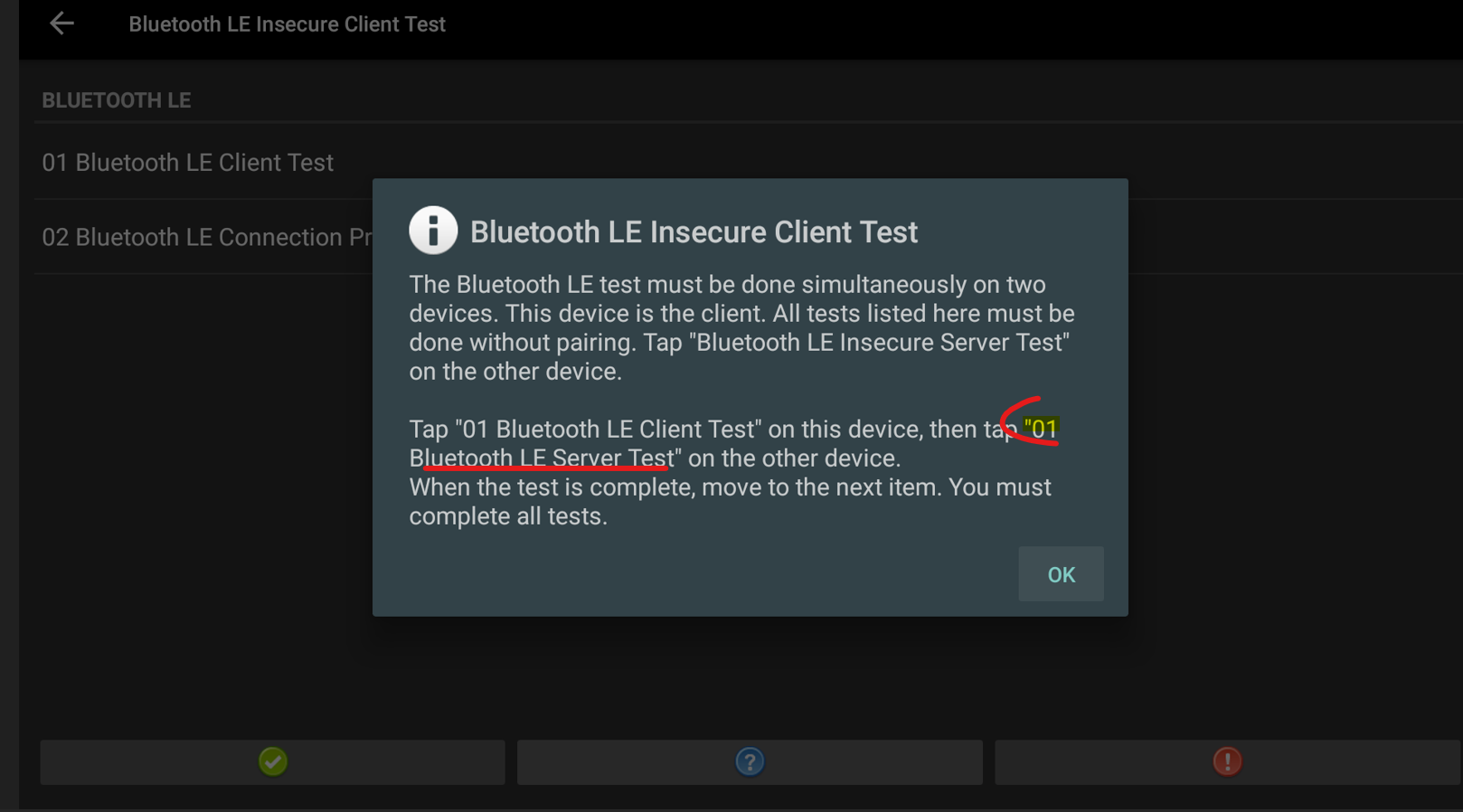
Hello, Kinbay, How can I run the "Bluetooth LE Client Test" for OS10? I can't find the menu which is named as "Bluetooth LE Server Test". Thank you. Sangmin Choi. cts_verifier.png (205,675 bytes) |
|
|
Hi Sangmin Sometimes we also face this situation. You can attempt another Bluetooth test, then the test case will display. Best Regards Kinbay |
|
|
Hi Sangmin About TVTS armeabi-v7a TvConcurrentMediaPlaybackHostTestCases That already has an issue tracker: https://partnerissuetracker.corp.google.com/issues/334970818 Google replied that this would not affect certification, and the uploaded TVTS report would not be marked as failed. Best Regards Kinbay |
|
|
Hello, Kinbay, Sometimes we also face this situation. You can attempt another Bluetooth test, then the test case will display. -> I have never seen the "Bluetooth LE Server Test" even I attempt many times. Could you please share the video which can be displayed "Bluetooth LE Server Test" menu from the beginning? The beginning means that there is no "Bluetooth LE Server Test" menu. Thank you. Sangmin Choi. |
|
|
Hello, Kinbay, Could you please check attached full Google xTS report if there is any problem or not? I didn't finish CTS Verifier yet. And, please also check this item for CTS Verifier. https://btracker-cns.fii-foxconn.com/vaas/view.php?id=1943#c16178 Thank you. Sangmin Choi. |
|
|
Hi Sangmin https://btracker-cns.fii-foxconn.com/vaas/view.php?id=1943#c16178 What version of CTS verifier are you using? 10r16? Are you using what version image to test with it? 15.542.538? Best Regards Kinbay |
|
|
Hello, Kinbay, I built the 15.541.538 firmware which is the latest firmware of eagle OS10. And, I used CTS Verifier 10_r16. http://altserver01.duckdns.org/build_bot/BFX-AT100/OS10/15.541.538_20240701-090656/SU/usb_bfx-at100_V15.541.538_SU.zip Thank you. Sangmin Choi. |
|
|
Hi Sangmin I compared 15,540,708 with your 15.541.538 and found that more failures have occurred as follows. Regarding the CTS & CTS-on-GSI, I think you can use the daily build tool to test all to fix it. CTS: test_result.xml:633831: <Test result="fail" name="testStrictMode"> test_result.xml:633938: <Test result="fail" name="testStrictMode"> test_result.xml:640123: <Test result="fail" name="shouldNotFindUnexpectedIntents"> test_result.xml:651668: <Test result="fail" name="main"> test_result.xml:655520: <Test result="fail" name="test_Provider"> test_result.xml:687349: <Test result="fail" name="test_S1P000005"> CTS-on-gsi: test_result.xml:33032: <Test result="fail" name="main"> test_result.xml:38441: <Test result="fail" name="testSocketTestAllAddresses"> test_result.xml:62209: <Test result="fail" name="test_Provider"> GTS: test_result.xml:35128: <Test result="fail" name="testVP9WebMCencSubSampleL3With360P60"> test_result.xml:35175: <Test result="fail" name="testVP9WebMCencSubSampleL3With720P60"> test_result.xml:40813: <Test result="fail" name="testSecurityPatchDate"> |
|
|
Hello, Kinbay, Okay, I will retry with daily build tool. And, for GTS, I know testVP9WebMCencSubSampleL3WithXXX items are auto waiver. Could you please check it? Thank you. Sangmin Choi. |
|
|
Hi Sangmin As I know some GTS media test cases are auto waiver, but not match with yours. If you want to confirm, you can try uploading a test version to Google to see if it has been auto-waived. BTW, you still can retry more times to get the pass. Best Regards Kinbay |
|
|
Hi Sangmin Sorry, I misread it. testVP9WebMCencSubSampleL3WithXXX should be possible to waiver. Best Regards Kinbay |
|
|
Hi Sangmin About the "Bluetooth LE Server Test" problem you can use an Android phone to test it. Best Regards Kinbay |
|
|
Hello, Kinbay, Thank you, "Bluetooth LE Server Test" can be passed using Android phone. Best Regards, Sangmin Choi. |
|
|
Hello, Kinbay, for CTS result, Following items are clear now. test_result.xml:633831: <Test result="fail" name="testStrictMode"> -> It was passed after set the persist.sys.skb.mode as 1. test_result.xml:633938: <Test result="fail" name="testStrictMode"> -> It was passed after set the persist.sys.skb.mode as 1. test_result.xml:651668: <Test result="fail" name="main"> -> It was passed with daily build tool. test_result.xml:655520: <Test result="fail" name="test_Provider"> -> It was passed with daily build tool. test_result.xml:687349: <Test result="fail" name="test_S1P000005"> -> It was passed when I retry. But, this item can't be passed using daily build tool. test_result.xml:640123: <Test result="fail" name="shouldNotFindUnexpectedIntents"> I found it's related with katniss version. The prebuilt katniss version is 7.10.20240225.1_cl.4 and the test fails. When I update the katniss version to 7.12.20240616.6, then the test success. I think the katniss version should be updated for next certification. Now, we don't have any schedule for 3PL or self MR certification of eagle OS10. So, we can just ignore it now. Thank you. Sangmin Choi. |
|
|
Hi Sangmin Thanks for your info Best Regards Kinbay |
|
|
Hello, Kinbay, for CTS-on-GSI result, Following items are clear now. test_result.xml:33032: <Test result="fail" name="main"> -> It was passed with daily build tool. test_result.xml:38441: <Test result="fail" name="testSocketTestAllAddresses"> -> It will be passed under IPv6 network. test_result.xml:62209: <Test result="fail" name="test_Provider"> -> It was passed with daily build tool. I think testSocketTestAllAddresses can be passed under IPv6 network, but I didn't get the passed report yet. And, the google test of Eagle OS10 has almost completed. I will close this ticket when I check the result of testSocketTestAllAddresses. I'm really appreciate your help. Thank you. Sangmin Choi. |
|
|
Hello, Kinbay, I've checked testSocketTestAllAddresses was passed for CTS-on-GSI. The self MR of Eagle OS10 is complete. Thank you. Sangmin Choi. |
- yk.jung ( (ALTech) Younkwang Jung ) developer
.png)

.png)
.png)
.png)